See more of PoE: camera zoom, full minimap and monster HP bars
PoE's camera is too close: off-screen deaths
Both Path of Exile 1 and Path of Exile 2 lock the camera tightly over your character and ship no built-in zoom setting. On big monitors and laptops alike, the result is the same: the screen shows a small slice of the arena while the action you care about happens just past its edge. Onslaught packs, projectiles, boss telegraphs and ground effects arrive from a zone you cannot see, and you die not because you misplayed but because the threat was never on your screen.
Two related pains stack on top. The minimap in the corner only fills in as you physically walk each section, so exploring maze-like layouts is guesswork. And monster HP bars are not always shown by default, which hides rares in a pack and makes it hard to judge how much longer a target will take to kill. Prism — the flagship feature of the QoLab utility — solves all three at once by changing how your client renders, not how the game plays.
Camera zoom 1.2x-2.4x in Prism
Prism gives you a smooth camera zoom from 1.2x to 2.4x — you decide how far to pull the view out. Even a modest 1.4x-1.6x noticeably widens your field of view: enemies and AoE enter the frame earlier, giving you time to react and dash out of danger. If you want the panorama, 2.0x-2.4x delivers a tactical view of the whole room.
Technically this is not a "zoomhack". Prism does not touch the game process and does not read memory — it edits your local client assets (the game data archive Content.ggpk / _.index.bin) offline, while the game is closed. What changes is how the client draws the scene on your own machine; there is no effect on the server, on other players, or on gameplay. The setting works in both PoE 1 and PoE 2.
Reveal the full minimap: see the whole level
A separate toggle fully reveals the level's minimap — the entire layout is visible at once, with no need to run down every dead end. That speeds up mapping and the labyrinth: you can immediately see where the exit is, where the boss branch leads, and which way to go for the quest objective.
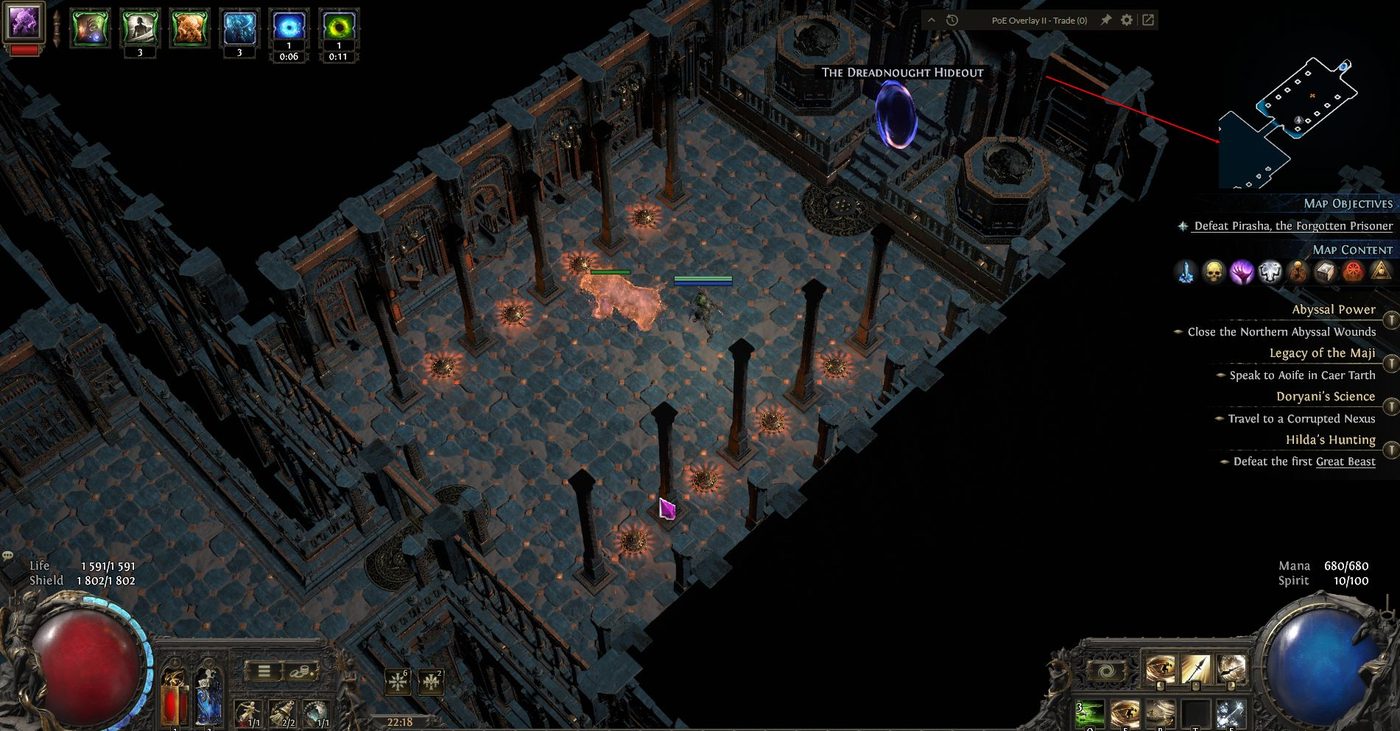
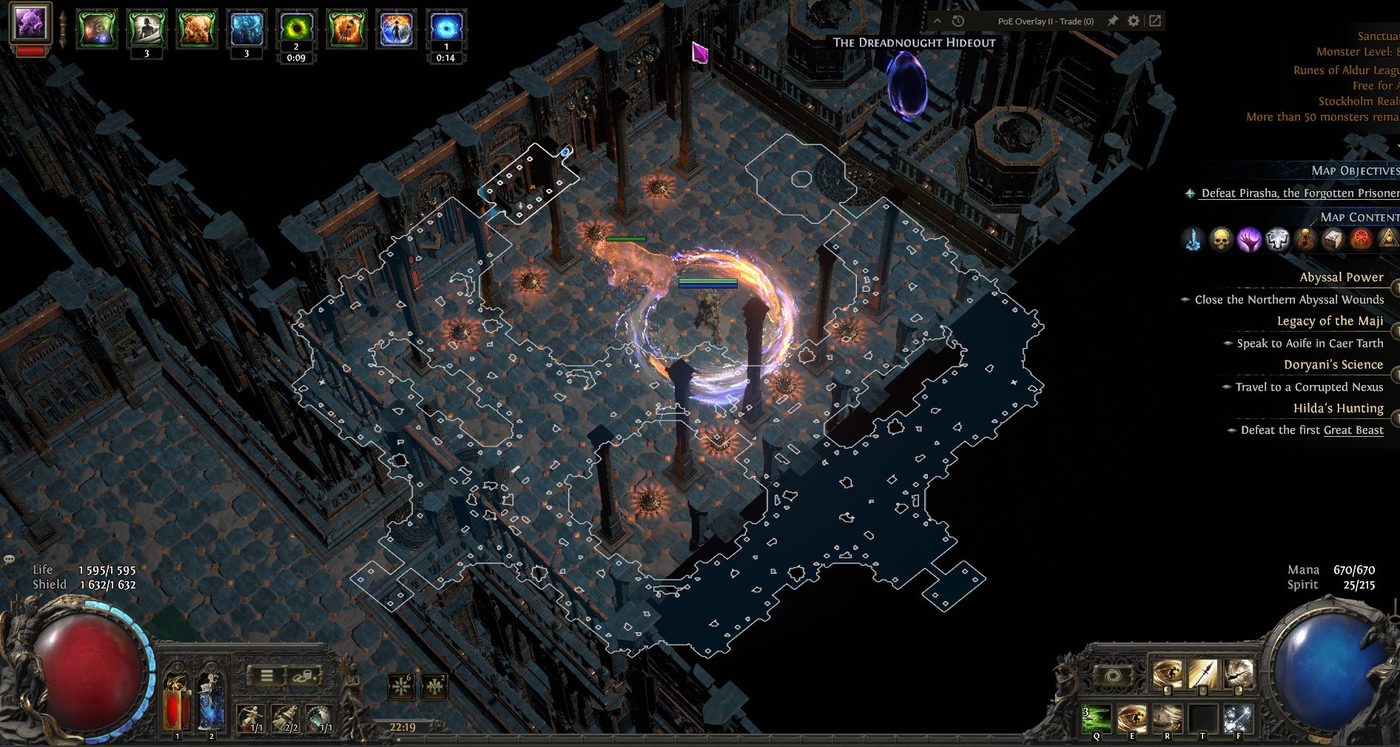
Let's be honest about what this is: it is not a maphack. Maphack tools read process memory in real time and overlay monsters, chests and items on top of the game — those are exactly the tools anti-cheat has historically targeted. Prism does none of that. It simply lifts the "fog of exploration" off the map locally, as a visual setting, and shows nothing beyond what is already in the level files. There is no enemy ESP and no loot highlighting here.
Always show monster HP bars: spot rares, track damage
The "always show HP bars" toggle keeps health bars over enemies on at all times. This is pure quality-of-life and combat readability: in a dense pack you instantly spot rares and uniques by their bars, it's easier to judge whether one more hit will finish a target or whether it's time to back off, and you can tell at a glance whether your build is actually working on tanky mobs. There is no numeric "leak" of hidden mechanics — it's the same information the game already draws, just switched on permanently.
A safe alternative to maphack/zoomhack tools (offline, no memory)
The core difference between Prism and "cheat" tools is the method. Prism modifies local client assets only — it does not inject into the process, does not read or write the game's memory, and does not interact with GGG's servers. The game is closed while it works. Before making changes it keeps a full backup, and one click on "Restore to vanilla" reverts everything.
Honest about the rules: GGG's Terms of Service do technically forbid client modification — that is a fact and we won't hide it. That said, what is known is that bans have historically targeted bots and memory-reading/automation tools, not offline cosmetic file edits. That's "what is known", not a guarantee. We deliberately never claim "100% safe", "undetectable", or "you won't be banned" — the decision is yours to make. The phrasing worth trusting: Prism modifies local client assets only, and does not inject into the process, read/write memory, or interact with servers.
Changes persist in-game until the next client update or league start (roughly every 3 months) — after a patch you simply re-apply the edits in one click.
How to enable it in Prism
- Close Path of Exile completely.
- Open Prism and point it at your game folder (PoE 1 or PoE 2).
- In the visual patches panel, set the camera zoom (1.2x-2.4x), enable full minimap, and turn on "always show HP bars".
- Apply — Prism makes a backup and writes the edits into your client files.
- Launch the game and enjoy the wider view. Want to roll back? Hit "Restore" to return to vanilla.
More vision, higher FPS on weak PCs, and no memory reading. See the Prism overview, the FPS boost guide, and the frequently asked questions.
Ready to see more? Download Prism and tune the camera to your taste.